How do you automate your inbox so no lead is missed?
Email automation for a small business is not newsletters. It is your inbox reading itself: every email sorted, every lead sent to your phone on Telegram, and the reply written for you from a quick voice note.
Connect your inbox to an automation tool such as n8n, let AI read and sort every new email, and send each real lead to Telegram with a short summary. Reply from Telegram by voice note, have the system write the email with your signature, and send it with one tap. Nothing goes out without you. A system like this starts from £2,000.
Why do leads get missed in email?
A small business inbox holds everything at once: new enquiries, existing clients, invoices, suppliers, cold offers and spam. When you are on a job or with a client, the real lead sits among them until you are back at a desk. By then the customer has often emailed the next business on the list. A slow reply loses more work than a bad one.
What does an automated inbox do?
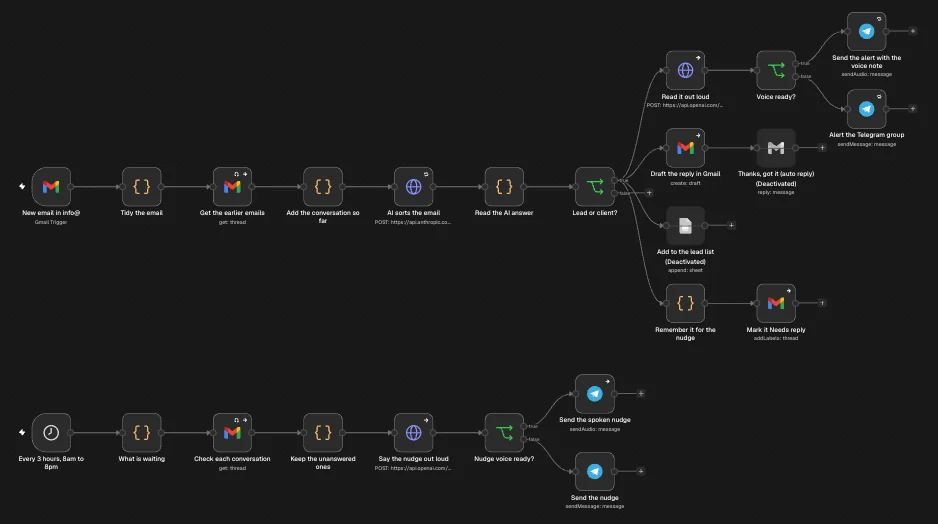
- Reads every new email the moment it arrives, along with the conversation before it.
- Sorts it with AI: a new lead, an existing client or spam, and what they are asking for.
- Sends the lead to Telegram with who it is, what they said and a short spoken briefing you can listen to between jobs.
- Drafts the reply in your inbox, ready to check.
- Nudges you every few hours about anything still waiting, until it is answered.
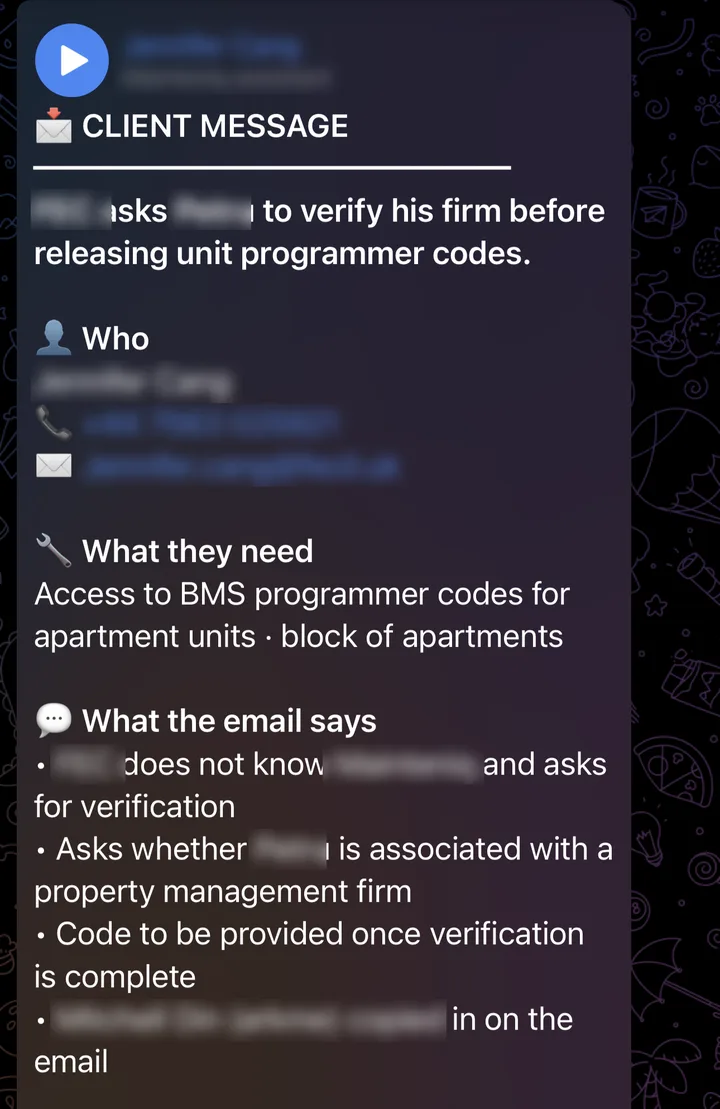
A new email arrives as a Telegram alert: who it is, what they need and what the email says, with a voice briefing to play.
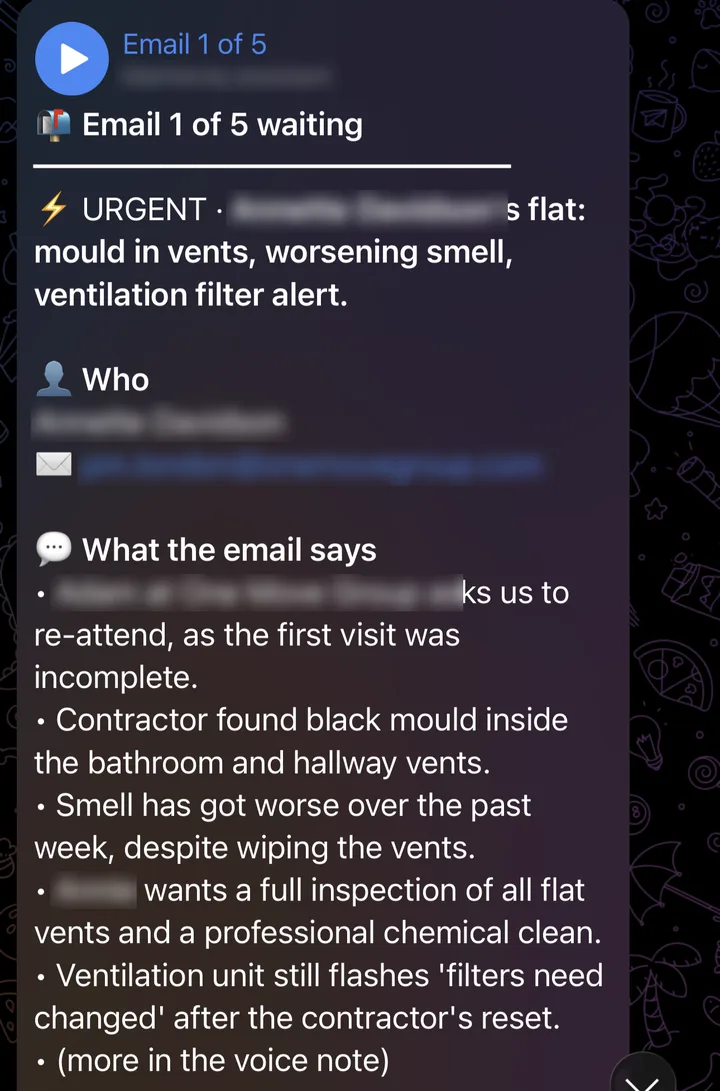
Type "Read my emails" and it goes through every email still waiting, one at a time, urgent ones flagged.
How do you reply to an email from Telegram?
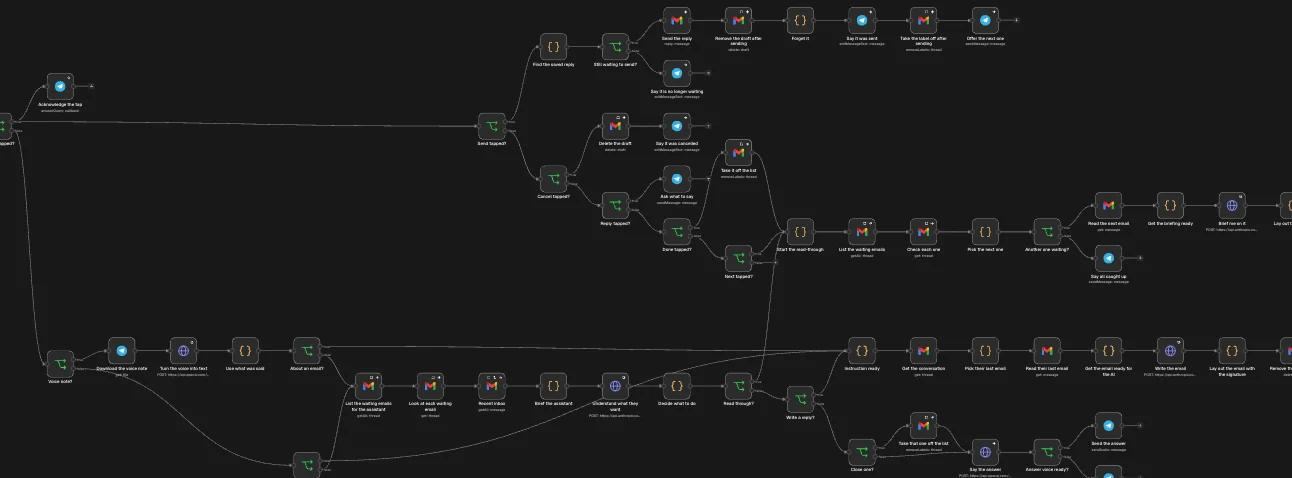
Reply to the alert with a voice note or a few typed words, such as "thank them, say we can visit Thursday morning and ask for the postcode". The system turns your voice into text, works out what you want to say and writes a proper email with the greeting, the details and your real signature. It shows you the email first with Send, Change or Cancel. You can also ask it to read you every waiting email, one at a time, and answer each one in turn.
Is it safe to let AI handle your email?
Done properly, yes, because the AI never has the last word. It connects through the official Google or Microsoft sign in, only the people you approve can use the Telegram controls, and nothing is sent until someone taps Send. If any step fails, a separate workflow messages you on Telegram straight away, so a problem never goes unnoticed.
How much time does email automation save?
Take an owner who spends an hour a day checking, sorting and answering email. That is about 5 hours a week, or around 230 hours over 46 working weeks. At £25 an hour, that is close to £5,750 of time a year, before counting the leads that no longer slip through. Your own numbers will differ, and the time back calculator works them out.
How much does email automation cost for a UK small business?
An email to Telegram system like this is one workflow, which starts from £2,000. Adding replies from Telegram, quotes, bookings or invoices makes it several connected workflows, typically £3,000 to £8,000. You get a fixed price in writing after a free workflow call, and once it is live we keep it running on a monthly plan agreed with you.
How do you get started?
You do not need new software or a new email address. On a free workflow call we look at your inbox, how leads come in and who needs to see them, then show you what could run on its own. If calls are your bigger leak, read missed call text back, and for the wider picture, how to automate your small business.
Related questions
Does the AI send emails on its own?
No. The AI reads and sorts every email, drafts the reply and turns your voice note into a finished email, but nothing is sent until you tap Send in Telegram.
Does it work with Outlook as well as Gmail?
Yes. The example on this page runs on Gmail, and the same kind of system can be built on Outlook and Microsoft 365. We check what you use on the free workflow call.
Why Telegram and not WhatsApp?
Telegram is free, works on every phone and computer, and lets the alert carry buttons and voice notes, so you can read, reply and send without opening your inbox. If your team lives somewhere else, we look at that on the call.
How much does email automation cost?
An email to Telegram system like this one starts from £2,000 as one workflow, with a fixed price in writing after a free workflow call. Bigger systems with several connected workflows are typically £3,000 to £8,000.
Do I need to change my email address or software?
No. It connects to the inbox you already have through the official sign in, and your customers keep emailing the same address.
Want your inbox to read itself?
Book a free workflow call. No pitch, direct access to Yekta.
Book a free 20-minute call